
An add2wallet.link is not a file. It is an individually keyed, signed and monitored door to a pass that lives in the customer's Apple, Google or Samsung Wallet. Standard protection applies to every link with nothing to configure; per-template controls let you lock a high-value pass to the recipient's handset. It is built on MobileDigital's patented Multidimensional Verification (MDV) model, which checks the message, the device and access to the redemption value rather than relying on possession of a link.
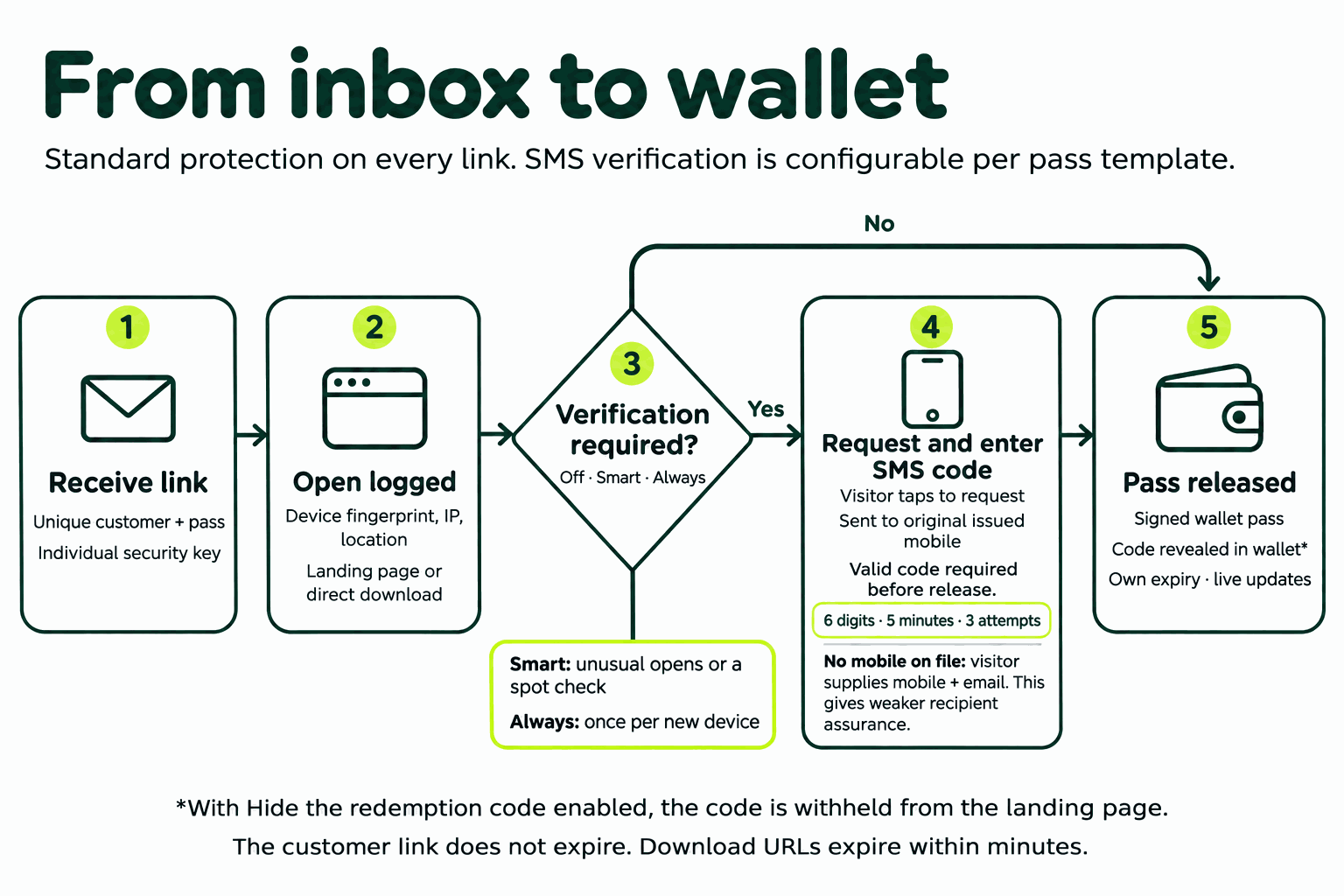
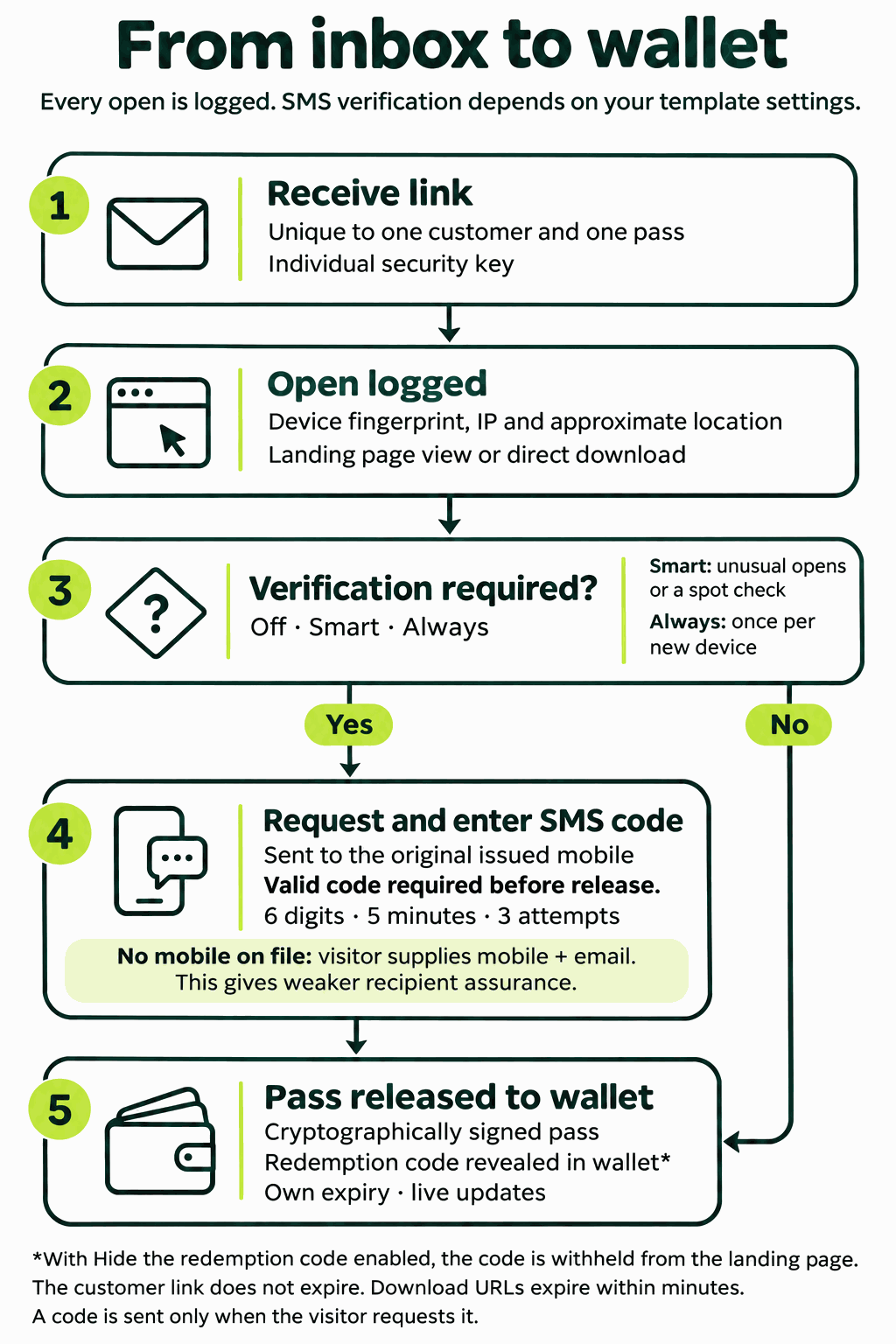
The path from inbox to wallet, with the checkpoints marked. Standard protection on every link; SMS verification is set per pass template.
These mechanisms run on every add2wallet.link you send, whatever the template. Each one states what it does and the condition under which it applies.
Every link is a random 8-character identifier paired with its own 7-character security key, both base62, so addresses cannot be predicted or enumerated.
The key is checked on every request for links issued under key enforcement; a request that arrives without the matching key is refused before any pass data is read.
Each pass is cryptographically signed for Apple Wallet, Google Wallet and Samsung Wallet, so it cannot be altered or counterfeited after issue.
The wallet verifies the signature when the pass is added and rejects anything whose content does not match it.
The pass file itself is served through URLs that expire within minutes of being issued.
The add2wallet.link the customer holds does not expire; it leads to a fresh, short-lived download each time it is opened, so a captured download URL is useless shortly after.
Each open is recorded against the pass it targeted: timestamp, device, operating system and browser, IP address and network, approximate location, request type and a device fingerprint.
Request type distinguishes a landing-page view from a direct download, so the log shows how the pass was reached, not just that it was.
On every open, the handset's own timezone is compared with the timezone of its IP geolocation, and the network is checked against a curated list of cloud, hosting and commercial VPN providers.
A mismatch or a listed network marks the open as a suspected VPN, proxy or datacentre request. These are classifications, not certainties, and we describe them that way in the log.
Because every open carries a device fingerprint and IP address, an open from a different device, from a different country, or a direct download with no preceding landing-page view is identifiable in the pass's log.
This is what the per-template controls below act on; on its own, it gives you the evidence of a forwarded or shared link.
Automated traffic is identified from the request itself and marked as such in the log.
Requests are rate-limited per IP at the API edge, so a single source cannot hammer a link or the service behind it.
Each pass template carries its own security settings. A gift voucher with a redeemable code can require verification while the loyalty card alongside it stays frictionless. These controls are configured when the template is set up.
The barcode and code are withheld from the landing page and shown only once the pass is in the wallet.
A visitor who opens the link in a browser sees the pass, not the value; the code appears after the pass has been added. New templates default to on.
Three modes per template. Off: no challenge. Smart: a code is requested only when the open looks unusual. Always: a code is requested once from every new device.
Smart challenges on exactly these triggers: a suspected VPN or proxy; a country different from the issuer's; many distinct devices opening the same pass; a direct download that skipped the landing page; a new device once the pass has already been verified; and a random spot check. An open that matches none of them is released without a code.
Only the mobile number the pass was issued to. The visitor sees a masked version of that number and cannot nominate another.
If the pass was issued without a mobile number, the visitor supplies a mobile and email, which are captured against the pass once verified. This fallback proves control of a handset, not that it is the intended recipient's, and is weaker than issuing with the number.
A device that verifies is remembered against that pass and is not challenged again.
Memory is per pass, so a device verified for one pass is still a new device for another.
In Smart mode, a percentage you choose of downloads is challenged even when no other trigger fired.
The selection is deterministic per device, so refreshing the page or retrying the download cannot dodge a check once it has been drawn.
SMS verification only works as a control if it cannot be made expensive or exhausted. These limits apply whenever verification is on.
A code is sent only when the visitor taps to request it, never on page load, so a drive-by open costs nothing.
Six-digit code, five-minute expiry, three attempts. After that the visitor must request a new code.
One code is in flight per pass at a time, with a cooldown before a resend. Sends are capped per pass per day and per account per day, so a hammered link cannot run up your SMS bill.
Requests classified as automated see the verification screen but are never sent a code.
Codes are sent through your own intouch account at your standard SMS rate and are tagged in your API log, so verification spend is visible alongside your other sends.
Each pass carries its own expiry, set on the template, so value does not sit open indefinitely. Because the pass lives in the wallet rather than in the message, its content can be updated after it is sent: balances, offers, dates and terms change on the pass the customer already holds, without a new send.
Every request to a link is recorded against the pass it targeted, including the challenge decision and, when a code was requested, the reason it was. Reporting is available per pass and per account, so you can review a single customer's pass or the pattern across a campaign. Log data is held by us as the platform operator and is visible to your account, not to the visitor.
Possession of a link is never the only test. MDV checks the message, the device and access to the redemption value, and each mechanism on this page belongs to one of those three dimensions.
A keyed link that cannot be guessed, leading to a signed pass that cannot be altered.
Fingerprinted opens, and when a template calls for it, a code that only the original handset receives.
A code withheld until the pass is in the wallet, a pass with its own expiry, and live updates after issue.
Security settings are configured per pass template. Talk to us about configuring them for your passes.
Contact us